
I recently ran into an interesting thermal issue while running two NVIDIA DGX Sparks as a small distributed inference cluster using llama.cpp.
The two Sparks are directly connected over QSFP and use RDMA as the transport. With llama-server running on Spark1, and ggml-rpc-server running on Spark2, I’m using llama.cpp’s layer-split configuration with the DeepSeek-V4-Flash-0731-UD-Q4_K_XL model. The model is too large to run on a single Spark, thus the need to layer it over two Sparks.
Inference performance is fine at about 12 tokens/sec (tg_s), and the memory usage is split fairly evenly 70G/80G between the two systems, leaving good headroom for other models and tasks; however, I happened to notice Spark2 was running about 9°C degrees hotter than Spark1, even while the cluster was sitting idle.
One Core, Fully Busy
Looking at btop revealed a single CPU core on Spark2 sitting at 100% utilization while running the ggml-rpc-server process. This process handles communication between the main llama-server process on Spark1 and the distributed tensors on Spark2.
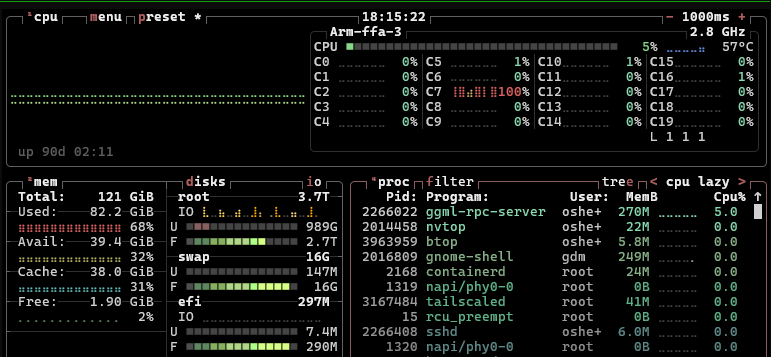
Although the ggml-rpc-server process was only taking 5% of the entire CPU, I could see the C7 core at 100%, even when no inference was being done.
This seemed to indicate a busy-polling condition. After looking for issues on the llama.cpp forums, and running some searches on the llama.cpp github repo, the busy-polling appeared to be related to llama.cpp’s RDMA completion handling. The RPC server busy-polls the RDMA completion queue instead of blocking while waiting for work. There are some llama.cpp options for using wait versus busy when using TCP sockets, but these options don’t apply for RDMA. Unless I wanted to start patching llama.cpp code, I needed other options.
Performance vs. Efficiency Cores
The GB10 CPU in the DGX Spark has 20 Arm cores split between performance and efficiency cores. On the DGX Spark, the cores are interleaved between efficiency and performance as follows:
Efficiency:   C0-C4, C10-C14    2.808 GHz
Performance:  C5-C9, C15-C19    3.900 GHz
Seeing the process on Spark2 running on C7 (see above screenshot) indicated the ggml-rpc-server was landing on a 3.9 GHz high-efficiency core. My guess was that the higher speed core was probably running hot while in this busy-polling mode. Moving the process to an efficiency core running at 2.8 GHZ might run cooler.
There is a way to set CPU affinity for running processes using taskset. Looking up the TID of the process, I was able to move it to an efficiency core (C14) using taskset.

taskset -cp 14 2266022
This moved the process to C14 and after a minute or so I could see the temperature settle at 52°C. Down from 57°C running on the performance core, this was a 5°C reduction. The polling loop was still running at 100%. I had only changed the kind of CPU core used. This seemed to confirm my guess about the temperature difference when running on the “hotter” CPU core.
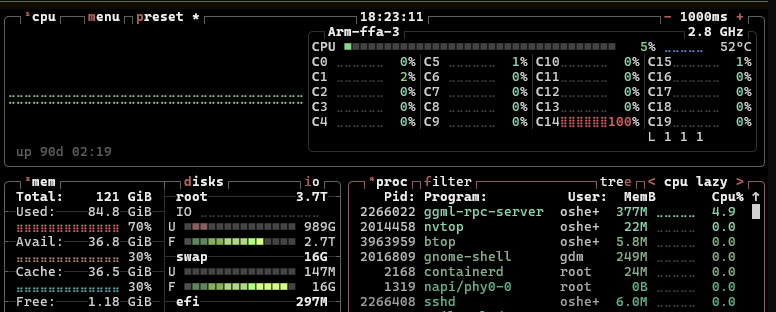
As for performance, after this change, I found token generation remained at about 12 tokens/sec.
Making It Permanent
There is a way to force a program to run on particular cores using taskset. I just needed to pin the ggml-rpc-server process to an efficiency core in my startup script as follows:
taskset -c 0-4,10-14 ./build/bin/ggml-rpc-server --host 169.254.103.215 --port 50052 --device CUDA0 -c
This still gives the process ten CPUs to choose from during initialization, while preventing the long-lived polling thread from migrating onto a performance core.
After the systems had been idle for a while, I was seeing approximately:
spark1  llama-server              ~46C
spark2  ggml-rpc-server + RDMA    ~51C
So this simple affinity change recovered about 5°C of thermal headroom with no measurable loss in inference throughput. Until llama.cpp gets around to addressing this issue in the their GGML RPC server, this should have some general use for anyone clustering models using the RDMA transport.
Pretty “cool” story…